Start from a template in minutes, or build advanced journeys visually. FlowSense, the AI layer
inside every flow, understands what the visitor is really saying, so a question is never
mistaken for an answer and the flow never loses its place.
Request a quoteChatFlow · step 2 of 3Email question
Thanks! What’s the best email to send your quote to?
Why do you need my email?
FlowSense · a question, not an answer
So we can send your quote and follow up on it. It’s only used for this request. Which email should we use?
anna.parker@studio.pl
FlowSense · valid email, saved to the flow
Email capturedanna.parker@studio.pl · Request a quote
The problem with scripted flows
Real visitors don’t follow the script. Your flow shouldn’t break when they don’t.
A scripted flow treats whatever comes next as the answer. Visitors ask why, change topic,
make typos, or come back later, and the script saves the wrong thing or starts over.
A scripted flow
What’s your email?
Why do you need my email?
Thanks! We’ll be in touch.
Saved as email“Why do you need my email?”
The question is stored as the answer
The visitor’s concern is ignored
Your team gets a lead it can’t contact
Zeltino with FlowSense
What’s your email?
Why do you need my email?
To send your quote. Which email should we use?
anna.parker@studio.pl
Saved as emailanna.parker@studio.pl
The question gets a real answer
The flow waits for the actual detail
Only a valid email is saved
Meet FlowSense6 safeguards
The AI knows where it is in the flow. And what each message really means.
FlowSense gives the AI the full flow context on every turn: which questions are open,
what has been captured, and what the visitor asked before. Every captured detail is then
checked by the platform before anything is saved.
01
Tells answers from questions
“Why do you need that?”, “Not now” or an unrelated reply gets a natural response. The question stays open instead of being filled with the wrong text.
02
Answers detours, keeps its place
Visitors can ask about delivery or pricing mid-flow. The AI answers from your knowledge, then returns to the step that is still waiting.
03
Checks every detail before saving
Emails, phone numbers, websites and numbers are validated by the platform, not just the AI. An invalid value is never stored as a lead.
04
Keeps parallel requests apart
A visitor can open a quote request and a booking in one chat. Each answer goes to the right request, and if it’s unclear, the AI asks which one they mean.
05
Picks up unfinished requests
Started a request and wandered off? The AI can offer to continue it later, with a simple yes or no, reusing details the visitor already gave.
06
Only confirms what really happened
Confirmations are based on recorded outcomes. The AI never claims a booking, callback or saved detail that didn’t actually happen.
Start in minutes9 templates
Ready-made flows for the outcomes you care about
Pick a template, adjust the questions and wording, and go live. Every template runs with FlowSense from the first conversation.
Leads & meetings
Collect contact details
Offer a contact form when a visitor wants to leave an inquiry.
Leads & meetings
Book a meeting
Open a calendar when a visitor asks to arrange a meeting.
Leads & meetings
Request a quote
Collect a visitor’s requirements and contact details for a quote.
Leads & meetings
Get help choosing a service
Ask one useful question, then collect details for tailored follow-up.
Engage visitors
Welcome visitors
Start a conversation with a friendly, timely greeting.
Engage visitors
Offer help on a specific page
Offer relevant help on a pricing, service, or checkout page.
Support
Report a technical problem
Collect a problem report and contact details, then notify the team.
Commerce
Report an order problem
Collect a problem report and contact details, then notify the team.
Commerce
Offer a coupon code
Collect an email, then reveal an existing coupon code in chat.
Go further
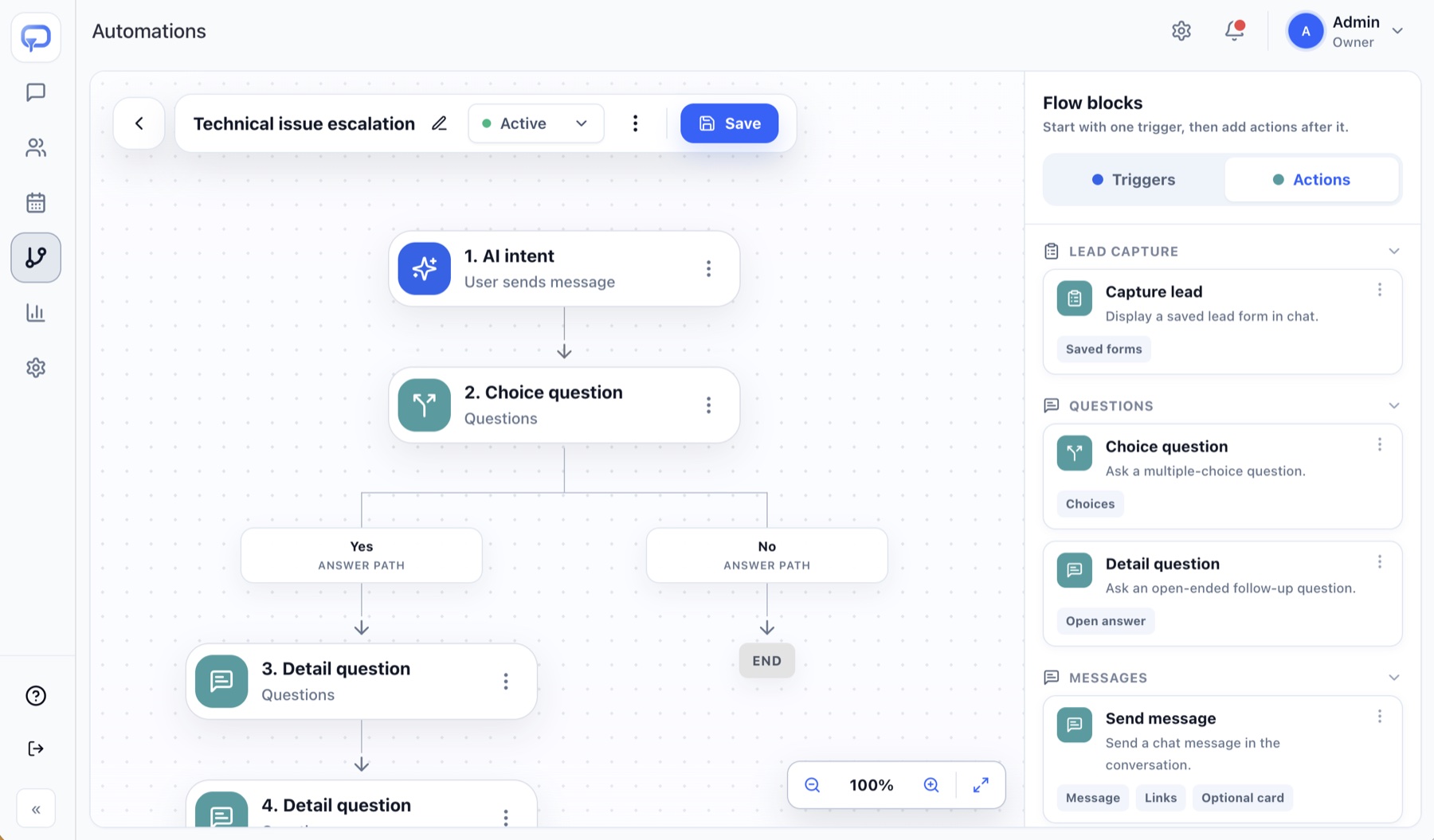
A visual builder for advanced journeys
When a template isn’t enough, open the visual builder. Combine triggers, questions,
branches and actions into a path that matches how your business handles enquiries.
Triggers
AI intent in the visitor’s own words, keywords, or a smart greeting on chosen pages
Questions
Choice questions that branch the path, and detail questions for emails, phones or free text
Actions
Send a message, show a lead form, offer a meeting, apply a category and notify the team
TriggerAI intent · pricing question
QuestionHow large is your team?
2–1011–5050+
GoalBook a demo call
Automation builderBranching pathsEach branch follows a process you define.
ChatFlows questions
No. Start from one of nine templates, adjust the questions and wording, and publish. Use the visual builder only when you need more advanced paths.
The AI explains, based on your flow and business knowledge, and keeps the question open. The detail is only saved once the visitor actually provides it.
Details are validated by the platform before they are saved. An invalid value is not stored, and the conversation continues so the visitor can correct it.
Yes. The AI answers side questions from your approved knowledge, then the flow continues from the step that is still waiting.
From an AI intent you describe in your own words, from keywords, or from a smart greeting on selected pages. The platform ranks matching flows and starts the best fit.
See where Zeltino fits your website
Start a 7-day free trial and set it up yourself, or book a short
product demo to see Zeltino on your website first.